

Privacy Policy
Xellion Ltd, a company incorporated in Saint Lucia under registration number 2025-00418 (“Xellion”, “our”, “us”, “the Company” or “we”), is committed to protecting the confidentiality and security of the personal information we collect about our clients and visitors to our website. Whether you are a former or existing client or a visitor to our website, the privacy of our users is one of our main concerns, and we are committed to safeguarding all personal information collected from you. We do not sell your personal information. We share it with third parties only in the circumstances described in point 8. If you have any questions or comments regarding this Privacy Policy, please contact us at .
1. This Privacy Policy explains how the Company collects, uses, stores, shares and protects your personal information, such as your full name, mailing address, ID number and passport number. By using our website and services, you acknowledge that your personal information will be processed in the manner described below.
2. The Company will collect personal information from clients under the following circumstances:
- When opening a trading account with the Company (e.g., by filling in electronic registration forms).
- When verifying your identity.
- When funding your personal trading account.
- When withdrawing from your personal trading account.
3. The personal information that may be collected includes:
- Personal information such as Full Name, Address, Date of Birth, Nationality, ID Number and Occupation.
- Identity verification information, such as a copy of your ID document, a photograph and the results of biometric and liveness checks.
- Financial information such as assets, investment experience and monthly income, in order to evaluate your trading experience.
- When funding your account or withdrawing from your account, we may request documents such as a copy of an ID document, utility bills and a bank statement.
4. The information collected from clients helps the Company understand your financial needs, provide you with products and services suitable to your needs, process your account transactions in a timely manner, meet our legal obligations, and provide you with the highest level of customer support.
5. Clients provide the Company with personal information in the following ways:
- On completion of electronic registration forms placed on the Company’s website or mini site(s).
- During identity verification.
- When funding or withdrawing from trading accounts, by providing the required documents.
- When trading on the Company’s system.
- When contacting the Company or responding to a promotion advertised.
6. Certain information is collected indirectly by the Company, such as IP address, operating system, software configuration and information collected through cookies.
7. The Company will use the information collected from clients for the following purposes:
- To verify client identity.
- To set up, maintain and manage client personal trading accounts.
- To process deposits and withdrawals in client trading accounts.
- To comply with our legal obligations, including anti-money laundering, counter-terrorist financing and sanctions screening obligations.
- To prevent and detect fraud and other financial crime.
- To keep clients up to date with news, updates and new promotions. You can opt out of marketing communications at any time by contacting .
- To analyse client activity in order to improve and provide better products and services.
- To provide clients with top-quality customer support.
8. The Company does not share any client information with third parties, except in the following circumstances:
- With service providers that help us open, operate and service your trading account, such as identity verification and screening providers, payment service providers, trading platform and technology providers, attorneys, accountants and auditors.
- In order to protect against fraud, money laundering, unauthorised transactions, claims or other liabilities.
- With introducing brokers who referred you to the Company, mainly for the calculation of their compensation.
- With competent authorities, where we are required to do so by law.
Because we serve clients internationally and use service providers located in different countries, your personal information may be transferred outside your country of residence. We take reasonable steps to ensure that it remains appropriately protected.
9. Data Security
The Company applies appropriate technical and organisational measures to protect your personal information against unauthorised access, loss or misuse. Access to personal information is restricted to persons who need it to perform their duties.
10. Data Retention
We keep your personal information only for as long as necessary for the purposes described in this Privacy Policy. To comply with our anti-money laundering obligations, identification, verification and transaction records are retained for at least seven (7) years after the end of the client relationship or the date of the transaction, or longer where required by law.
11. Your Rights
You may request access to, correction or deletion of your personal information, or object to its processing, by contacting . We may be unable to delete information that we are required to retain by law, as described in point 10.
12. Links
Links to external sites may be found on the Company’s website. The Company takes no responsibility for the content of external websites and advises all clients to read the privacy policy of those external websites before submitting any personal information.
13. Changes to this Privacy Policy
We may update this Privacy Policy from time to time. The current version is always available on our website.
Xellion Trader App - Deleting account
To delete your account, follow the instructions below:
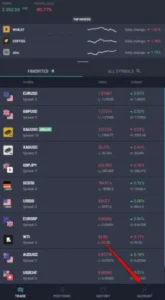
- Open the Xellion Trader application and click on Account tab.

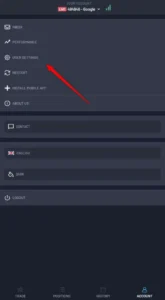
- Click on User settings.
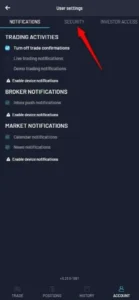
- Click on Security tab.

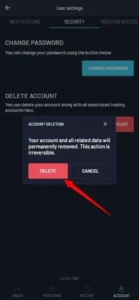
- Click on Delete Account.
- After that step, an account is permanently removed.
Upon a user’s request for account deletion, the user’s data is removed from our active systems, except for: the user’s email address, name and surname, which are retained to record when the user requested deletion of their account; and
identification, verification and transaction records that the Company is required to retain under anti-money laundering laws for at least seven (7) years, as described in point 10.
The email address, name and surname can be removed on request once no legal retention obligation applies.